


I use grocery delivery when the shopping itself is the problem, not because I dislike grocery stores. A packed workday, a sick child, bad weather, or a kitchen that needs restocking can make a normal trip feel like a project. Publix Delivery & Curbside is built for that situation: it brings the Publix shopping experience into a mobile app and connects delivery with curbside collection. In my experience, its appeal is less about novelty and more about removing several small errands from the week.
This is a Food & Drink app from Publix Super Markets Inc., and it is free to install. That distinction matters: installing the app does not itself make the groceries free, and the final value depends on the order you place and the service option you choose. I would judge it as a convenient shopping tool rather than a discount product. If you already buy from Publix, the app can make that routine easier; if you are searching for the absolute lowest grocery bill, convenience may not be your only priority.
How Publix Delivery & Curbside fits into a real shopping routine
Two ways to avoid a full store visit
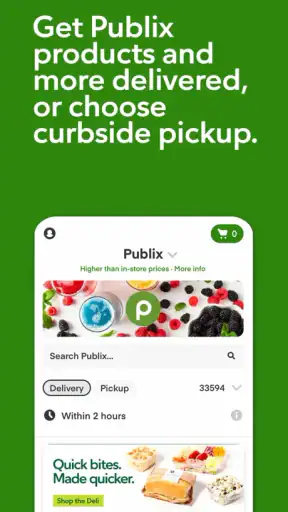
The app’s central choice is straightforward. You can arrange for groceries to come to your door, or you can place an order and collect it through curbside service. Those options solve different problems. Delivery is useful when leaving home is difficult or when the time spent driving, parking, and walking through the store is worth more to you than the convenience cost. Curbside is a better middle ground when you are already near the store and want to avoid browsing, checkout lines, or carrying a large order through the aisles.
I especially like the distinction for planned weekly shops. I can think through the household list away from the store, add the essentials, and then choose collection when I am passing by. For a late addition or a heavier basket, delivery is more attractive. Having both routes in one Publix-focused app means I do not have to use one workflow for every kind of shopping day.
The service is powered by Instacart, which helps explain why the experience feels like a grocery-ordering platform rather than a simple digital version of a paper shopping list. That connection is useful for people who already understand online grocery ordering, but it also means the app should be approached as an ordering service with its own availability and fulfillment details. The store’s physical inventory and the selected service can affect what makes sense for a particular order.
What the free download actually gives you
The app is free, and its age rating is Everyone, so the basic barrier to trying it is low. I would still separate free access from the cost of using delivery or curbside for a particular basket. Groceries remain a purchase, and service-related charges or order conditions may influence the final total. Since those details can vary by order and location, I would check the complete checkout summary instead of assuming that the shelf price tells the whole story.
That is the most important value lesson here: the app saves time and effort, not necessarily money. A free app can still lead to a more expensive shopping trip if convenience encourages extra items or if the delivery route costs more than a normal store visit. On the other hand, a small added cost can be worthwhile when it prevents a missed work shift, an unnecessary drive, or a difficult trip with children.
I also would not treat the strong store presence as proof that every order will feel identical. The app has an average rating of 4.7 from around 39 thousand ratings, which suggests that many people find the experience useful, but an average cannot predict how a specific store handles substitutions, timing, or a busy shopping period. I see that rating as a reason to try the app, not as a guarantee that every order will be perfect.
A practical order workflow
My preferred approach is to begin with a short, deliberate list rather than opening the app with no plan. I add the items that are genuinely needed first, then review the basket before choosing delivery or curbside. This reduces the temptation to treat the app like a browsing catalog and makes it easier to notice duplicate purchases, oversized quantities, or items that would be simpler to buy during a normal visit.
For a family order, I would divide the basket mentally into three groups: items that cannot be skipped, items with an acceptable substitute, and items that should be removed if unavailable. This is a small but important habit. Substitutions can be helpful for everyday staples, but they are less welcome when a recipe depends on a particular size, flavor, dietary specification, or brand. Thinking about that before checkout makes the order easier to manage.
Another useful habit is keeping a little flexibility in the meal plan. If I order ingredients for one exact dinner and a key item is unavailable, the whole plan can become inconvenient. A better online-shopping routine is to choose a main meal plus a backup that uses similar ingredients. That is not a special feature of the app; it is a practical way to reduce the impact of inventory changes when ordering groceries remotely.
Where the app is genuinely convenient
The strongest benefit is not simply avoiding a line. It is the ability to move grocery planning away from the store. In a physical shop, I often remember household items only after seeing a related aisle. With an app, I can check the refrigerator, pantry, and cleaning cupboard first, then build the order with fewer lapses in memory. That makes the service particularly useful for repeat purchases and household restocking.
Delivery is also valuable for people who should not be lifting heavy bags or navigating a crowded store. Someone recovering from an injury, caring for a newborn, working irregular hours, or dealing with limited transportation may find that the app changes grocery shopping from a major outing into a manageable online task. Curbside can serve people who still want to pick up the order themselves but do not want to spend time walking through the store.
For me, the best scenario is a busy weekday evening. I can place an order during a break, finish work, and either collect it on the way home or have it delivered when that is the more sensible choice. The benefit is not that the app makes food cheaper. The benefit is that it protects a block of time that would otherwise disappear into travel, parking, shopping, and checkout.
Trade-offs that deserve attention
The first trade-off is control. In-store shopping lets me inspect produce, compare package sizes directly, and change my mind while standing in front of the shelf. An online order gives me a cleaner plan but less physical judgment. That matters for fresh food and for purchases where appearance, ripeness, or exact size is important. If selecting those items personally is a major part of your shopping style, delivery may feel like a compromise rather than an improvement.
The second trade-off is substitution risk. A replacement can save an order when the preferred item is unavailable, but it can also create a problem if the alternative does not fit your recipe or diet. I recommend reviewing substitution choices carefully and avoiding vague planning for meals that depend on exact ingredients. For allergy-sensitive households, I would be particularly cautious and inspect every replacement instead of assuming that a similar-looking product is equivalent.
Timing is another consideration. A store visit gives me immediate possession of the groceries. An app-based order asks me to work around a selected fulfillment window or pickup process. That is fine for planned shopping, but it is less suitable when dinner depends on an item needed right now. In that case, a quick trip to the store can be more predictable than arranging an order.
There is also a behavioral downside. Digital baskets make it easy to repeat a familiar list, which is convenient but can hide price changes or prevent me from noticing a better-sized option. I try to review quantities and compare the unit value where the app makes that practical. Convenience should shorten the process, not remove the final moment of judgment before payment.
How it compares with ordinary alternatives
Compared with shopping inside a Publix store, the app wins on planning, accessibility, and time. The store wins on immediate availability, personal selection, and the ability to discover an alternative without waiting for an order. I would use the app for a structured restock and the physical store for a small urgent purchase, delicate fresh items, or a trip where browsing is part of the enjoyment.
Compared with a general grocery marketplace, Publix Delivery & Curbside is more focused. That focus is useful if Publix is already your preferred store and you want a direct route into its grocery selection. A broader marketplace may be better for comparing several retailers in one place, especially when price comparison or cross-store availability matters more than staying with one chain. The better option depends on whether convenience within Publix or wider comparison is your priority.
Compared with calling a store or making a handwritten list, the app provides a more organized way to prepare an order and choose between doorstep delivery and curbside collection. Compared with a normal in-person trip, it asks me to accept less control over the physical selection. I see it as a complement to store shopping, not a universal replacement.
Who is likely to get the most value
This app is a strong fit for regular Publix customers who already know what they buy and want a faster repeat process. It is also well suited to households that place larger planned orders, people who have difficulty getting through a store, and workers whose schedules make traditional shopping inconvenient. The free installation makes experimenting with the workflow relatively easy, while the choice between delivery and curbside gives users room to match the service to the day.
I would recommend it to a parent who wants to build a basket after the children are asleep, a commuter who can collect groceries on the route home, or an older adult who prefers not to carry heavy bags. It can also help someone managing a household budget if the app is used with a prepared list and a careful checkout review. The savings in time may be more meaningful than a small price difference for those users.
I would be less enthusiastic for someone who shops only for a few items at a time, enjoys choosing every piece of produce personally, or regularly needs groceries immediately. It is also not my first choice for a shopper whose main goal is to compare several stores for the lowest overall total. In those cases, walking into the store or using a broader comparison approach may offer better control.
Device support and the overall level of trust
The app supports devices running Android 8.0 or later, which covers a wide range of phones but still makes the operating-system requirement worth checking before installation. The current version is 9.30.0, and the app has passed one million installs. Those figures show that this is an established shopping tool rather than an obscure experiment, although popularity alone does not remove the need to inspect each order before confirming it.
Its Everyone content rating also makes it suitable as a household grocery tool rather than an age-restricted service. I would still keep account and payment decisions with the adult placing the order, especially in a shared family device. The important practical question is not whether the app is difficult to install; it is whether the selected store, service option, and basket suit the specific shopping task.
My verdict on the value
Publix Delivery & Curbside delivers its best value through convenience, not through a promise of cheaper groceries. Because the app itself is free, trying the ordering workflow does not require a purchase commitment. The real decision comes later: whether delivery or curbside saves enough time, effort, or physical strain to justify the total shown for the order.
I would start with a modest, non-urgent order rather than making it my only grocery method immediately. Use a clear list, decide which items can accept substitutes, check the final total, and compare the selected service with the effort of an ordinary store trip. That first test will tell you more than a rating can about how well the service fits your local routine.
My recommendation is positive for Publix shoppers who value a planned, less tiring grocery run. I would choose curbside when I am already nearby and delivery when the trip itself is the burden. I would skip it for urgent one-item errands, highly selective fresh-food shopping, or situations where comparing multiple retailers is more important than convenience. For the right household, though, this is a practical way to turn grocery shopping into a shorter task while keeping Publix as the store behind the order.


